Remove an On-Premises Firewall Management Center from Security Cloud Control
This task removes an On-Premises Firewall Management Center and all its managed devices from your Security Cloud Control tenant to clean up your device inventory.
If you remove an On-Premises Firewall Management Center from Security Cloud Control, all devices managed by that On-Premises Firewall Management Center will also be removed.
The Remove On-Prem FMC and its managed devices action is available for On-Premises Firewall Management Center onboarded through Cisco Security Cloud.
Procedure
Step 1 | Choose . |
Step 2 | Click the FMC tab. |
Step 3 | Choose the On-Premises Firewall Management Center you want to remove. |
Step 4 | In the Device Actions pane, click Remove On-Prem FMC and its managed devices. |
Step 5 | To disable the FMC before removing it, click Security Cloud settings in the warning: 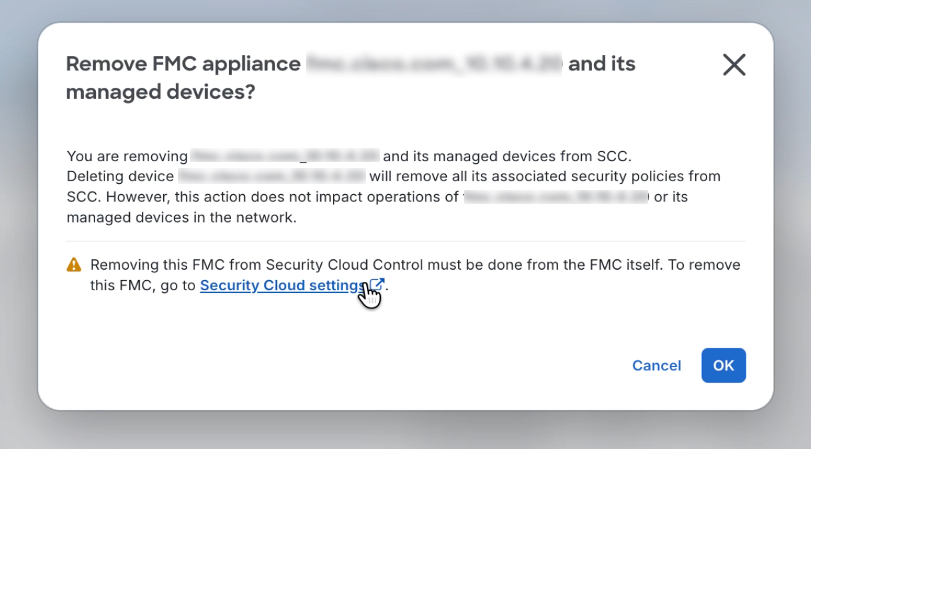 |
Step 6 | In the Verify FMC Cross Launch URL dialog, enter or verify the FMC’s public IP address or FQDN and port, then click Continue to open the FMC settings. Return to Security Cloud Control when you’re done. |
Step 7 | Review the confirmation details, then click OK to remove the FMC and its managed devices from Security Cloud Control. |
Step 8 | When prompted, click OK to refresh the Services table and view the updated device list. |
The On-Premises Firewall Management Center and all its managed devices are removed from your Security Cloud Control inventory.