Troubleshoot device connectivity loss after Cloud-Delivered Firewall Management Center update
This task helps restore management connectivity between your threat defense device and the Cloud-Delivered Firewall Management Center after the management center receives a new dynamic IP address during an update.
A Cloud-Delivered Firewall Management Center is assigned a dynamic IP address when it is added to a Security Cloud Control tenant. When the management center is updated, the management center receives a new dynamic IP address.
If you have a firewall inspecting the outbound traffic from your threat defense device to the Cloud-Delivered Firewall Management Center, your firewall rules must allow the threat defense traffic to flow to the FQDN and port of the management center rather than its IP address, or the management center will not be able to manage your threat defense device.
Procedure
Step 1 | Change your existing IP-based firewall rule to use FQDN-based rules for both required ports. For example, if your network traffic rule allowing management traffic from your threat defense device to the Cloud-Delivered Firewall Management Center looks like this:
where 200.165.200.225 is the management address of the Cloud-Delivered Firewall Management Center, change the one allow rule to these two allow rules as both ports 443 and 8305 need to be open:
See "Network Requirements" in Prerequisites to Onboard a Device to Cloud-delivered Firewall Management Center for more port information. |
Step 2 | Find the domain name of your Cloud-Delivered Firewall Management Center.
In the top-right corner of the screen, you will see the Hostname of the management center. This is the FQDN. 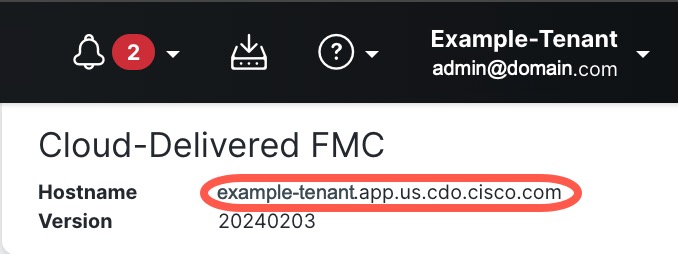 |
Your threat defense device can now maintain management connectivity with the Cloud-Delivered Firewall Management Center using FQDN-based firewall rules, even when the management center's IP address changes during updates.