Change a device's IP address in Security Cloud Control Firewall Management
Update the IP address stored in Security Cloud Control Firewall Management to match a device's new IP address without changing the device's configuration.
When you onboard an device to Security Cloud Control Firewall Management using an IP address, Security Cloud Control Firewall Management stores that IP address in its database and communicates with the device using that IP address. If the IP address of the device changes, you can update the IP address stored in Security Cloud Control Firewall Management to match the new address. Changing the device's IP address on Security Cloud Control Firewall Management does not change device's configuration.
To change the IP address, Security Cloud Control uses to communicate with a device, follow this procedure:
Procedure
Step 1 | Choose |
Step 2 | Click the Devices tab to locate the device. |
Step 3 | Click the appropriate device type tab. |
Step 4 | Select the device whose IP address it is you want to change. |
Step 5 | Above the Device Details pane, click the edit button next to the device's IP address. 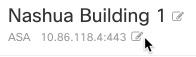
|
Step 6 | Enter the new IP address in the field and click the blue check button. No change is made to the device itself, so the device's Configuration Status will continue to show that it is Synced. |
The IP address stored in Security Cloud Control Firewall Management is updated to the new address, and Security Cloud Control will communicate with the device using the new IP address.