How Splunk Federated Search integration works with Cisco Security Analytics and Logging
This integration allows organizations to leverage both Splunk Cloud Platform capabilities and Cisco Security Analytics and Logging data through federated search functionality.
Summary
The key components involved in the Splunk Federated Search integration process are:
-
Firewall Threat Defense devices: Generate security events and send them to Cisco Security Analytics and Logging
-
Security Cloud Control: Manages the integration configuration and provides access tokens for Splunk
-
Splunk Cloud Platform: Configures dataset and role-based access controls
-
Splunk administrators: Configure the Splunk side of the integration and manage user access
Workflow
The completed integration enables users to perform federated searches of Cisco Security Analytics and Logging data directly from the Splunk Cloud Platform interface, providing unified access to security event data across both platforms.
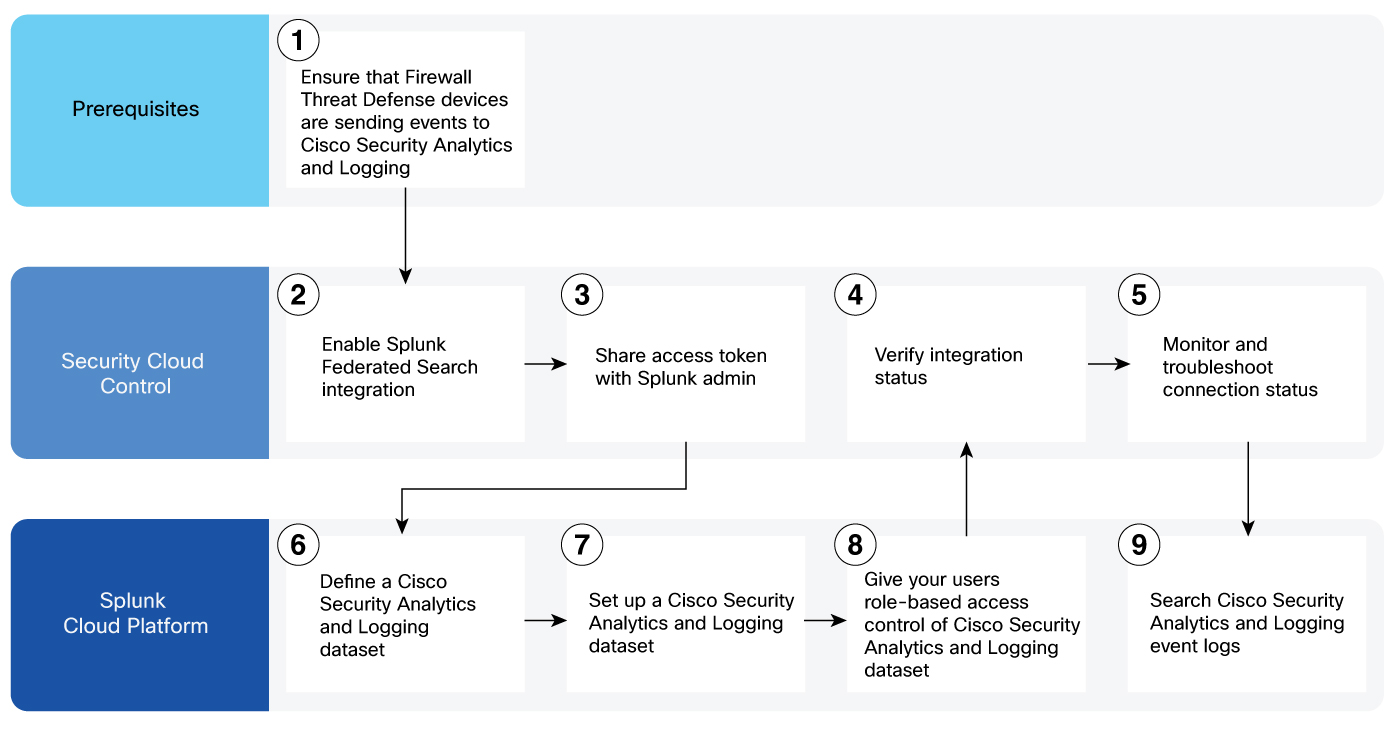
These stages describe how the Splunk Federated Search integration with Cisco Security Analytics and Logging works:
-
Prerequisites phase: Firewall Threat Defense devices send security events to Cisco Security Analytics and Logging.
- Ensure that Firewall Threat Defense devices managed on the Security Cloud Control platform are sending intrusion, file and malware, and connection events to Cisco Security Analytics and Logging. For more information, see About Security Analytics and Logging (SaaS) in Security Cloud Control.
-
Integration enablement phase: Security Cloud Control administrator enables the integration and shares access credentials.
- Enable Splunk Federated Search integration. For more information, see Enable Splunk Federated Search Integration with Cisco Security Analytics and Logging.
- Share the access token with the Splunk admin. For more information, see Enable Splunk Federated Search Integration with Cisco Security Analytics and Logging.
-
Splunk configuration phase: Splunk Cloud Platform administrator configures the federated search components.
- Define a Cisco Security Analytics and Logging dataset. For more information, see Splunk Federated Search for Cisco Analytics and Logging (SAL) - Splunk Side.
- Set up a Cisco Security Analytics and Logging dataset. For more information, see Splunk Federated Search for Cisco Analytics and Logging (SAL) - Splunk Side.
- Give your users role-based access control of Cisco Security Analytics and Logging datasets. For more information, see Splunk Federated Search for Cisco Analytics and Logging (SAL) - Splunk Side.
-
Verification and monitoring phase: Security Cloud Control administrator verifies integration status and monitors ongoing operations.
- Verify the integration status. For more information, see Verify Connection Status of Splunk Federated Search with Cisco Security Analytics and Logging.
- Monitor and troubleshoot the connection status. For more information, see Monitor and Troubleshoot Connection Status of Splunk Federated Search with Cisco Security Analytics and Logging.
-
Operational phase: Users search Cisco Security Analytics and Logging event logs through Splunk Cloud Platform.
- Search Cisco Security Analytics and Logging event logs. For more information, see Search your Cisco Firewall datasets.